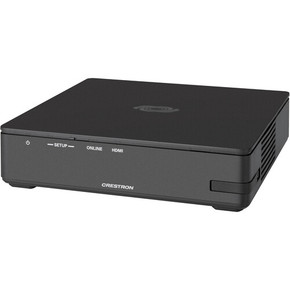


Few things derail a meeting faster than spending the first several minutes swapping adapters so that a guest can present, or waiting for a laptop to sync with the room’s TV. The Crestron AirMedia 3200 eliminates that friction by giving every presenter an immediate path to the screen.
This means that internal teams can jump on wirelessly to the Crestron AirMedia Receiver 3200 from any laptop or mobile device over your network, while external guests can simply plug into the native HDMI port. The AirMedia receiver’s built-in scaler automatically adjusts incoming video, handling up to 1080p input and outputting a crisp, uniform 4K60 signal to your display.
To avoid losing a meeting’s momentum due to presenters needing to disconnect before another person can share, the AirMedia 3200 Canvas allows your team to display up to four active sources simultaneously using native AirMedia apps, AirPlay Screen Mirroring, or Chrome extensions.
Instead of you having to manually resize windows, the receiver automatically calculates the screen layout based on the aspect ratio and number of active devices. This allows teams to make comparisons in their work and live dashboards, while presenters maintain control over source positioning using the AirMedia app or an optional Crestron touch panel.
Hybrid meetings become a lot easier when presenters don’t have to choose between the convenience of their personal laptops and the better quality of the installed room hardware.
By connecting your room’s USB cameras, soundbars, or speakerphones directly to the AirMedia 3200, Windows 10/11 users running the AirMedia app can access those peripherals wirelessly. Presenters can launch Microsoft Teams or Zoom from their familiar personal workspace while leveraging professional-grade room audio and video.
When a meeting room isn’t actively hosting a presentation, the Crestron AirMedia Receiver 3200 turns that blank display into an informational asset. The AirMedia receiver seamlessly integrates with Microsoft Exchange, Google Calendar, or Crestron Fusion to show real-time room availability, or pulls digital signage content directly from platforms like Appspace.
With the AirMedia 3200, this added screen value is equally seamless and secure because of:
No. The base AirMedia Receiver 3200 relies on an Ethernet connection to your local network and an external wireless access point (sold separately). If you need native Wi-Fi connectivity or a dedicated guest access point, select the AM-3200-WF.
The AM-3200 supports display control through compatible CEC, IP, IR, or RS-232 configurations. Depending on the setup, it can manage display power according to business hours, HDMI signal detection, or room occupancy when a compatible occupancy sensor is installed. An AirMedia connection by itself does not wake the receiver.
Yes. It has a wireless conferencing feature that lets users run Teams or Zoom calls directly from their Windows 10/11 laptops while wirelessly utilizing the room’s connected hardware.
At Chester Springs AV, we can help you select the AirMedia 3200 and accompanying hardware for your meeting goals and layout. We do this to help you effectively solve the workflow bottlenecks that come with choosing a presentation receiver.
This means that we’ll help you identify the right Crestron AirMedia Receiver 3200 configurations and accessories for your specific room layouts as well as provide you with expert design guidance. We’ll then provide you with curated hardware that comes with 30-day returns and exchanges.
If you’re ready to level up your communications, contact us today for a free 10-minute consultation.
Details
Few things derail a meeting faster than spending the first several minutes swapping adapters so that a guest can present, or waiting for a laptop to sync with the room’s TV. The Crestron AirMedia 3200 eliminates that friction by giving every presenter an immediate path to the screen.
This means that internal teams can jump on wirelessly to the Crestron AirMedia Receiver 3200 from any laptop or mobile device over your network, while external guests can simply plug into the native HDMI port. The AirMedia receiver’s built-in scaler automatically adjusts incoming video, handling up to 1080p input and outputting a crisp, uniform 4K60 signal to your display.

Why Us?