
Streamline your creative workflow with intuitive controls. Maximize precision with the dialpad and access countless customizations through the LCD display keys of the keypad.
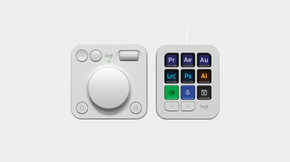
The Logitech MX Creative Console Graphite combines the MX Creative Keypad and MX Creative Dialpad, so frequently used tools, shortcuts, and adjustments stay close at hand. The keypad provides nine customizable LCD screen keys, while the wireless dialpad adds a low-friction aluminum dial, a roller, and customizable buttons for tactile control.
This setup is designed for creators who want to spend less time moving through menus and more time working directly with their tools.
Use Logi Options+ to customize controls, icons, actions, and app-specific profiles. Logitech supports recommended profiles and plugins for creative applications, and additional integrations are available through the Logi Marketplace. A Logitech MX Graphite setup can be tailored to the applications and commands you use most, while the keypad supports up to 15 pages per application for organizing larger sets of shortcuts.
The Logitech MX Creative Console Graphite uses two different connection methods. The MX Creative Keypad connects to the computer through USB 2.0 High Speed and is powered through the included 1.5 m USB-C to USB-C 2.0 cable.
The MX Creative Dialpad is wireless, supports Bluetooth Low Energy 5.1 and Logi Bolt USB connectivity, and uses two replaceable AAA batteries. Logitech estimates up to 18 months of dialpad battery life under normal use.
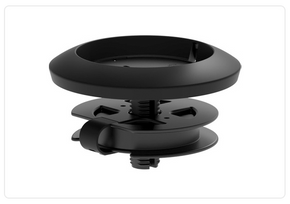
The included keypad stand can raise the display keys for easier viewing when the keypad sits farther from your normal line of sight. Logitech also recommends positioning the console around the non-dominant hand, which can leave the mouse hand available for pointing and selection while the Logitech MX Graphite controls handle shortcuts and adjustments.
The Logitech MX Creative Console Graphite is built for workflows that benefit from repeatable shortcuts and hands-on parameter control. Logitech lists integrations and profiles for applications such as Adobe Photoshop, Adobe Premiere Pro, Adobe Illustrator, Adobe Lightroom and Lightroom Classic, Final Cut Pro, DaVinci Resolve, Figma, Zoom, and Spotify.
Available profiles and plugins can change, so the current Logi Marketplace is the best place to confirm support for a specific application.
For users who regularly move between editing, design, photo, video, and other application-based tasks, a Logitech MX Graphite control surface can provide a consistent place for frequently repeated actions. The value comes from configuring the controls around your own workflow rather than relying on one fixed set of shortcuts.
Yes. Logitech lists Windows 10 or later and macOS 13 or later as supported operating systems for the MX Creative Console. Logi Options+ is used for customization, profiles, and supported plugins.
The MX Creative Keypad has nine LCD screen keys. They can be customized through Logi Options+ for shortcuts, actions, profiles, and other supported controls.
Yes. The dialpad supports Bluetooth Low Energy 5.1 and Logi Bolt USB connectivity. The MX Creative Keypad is the wired component and connects through USB 2.0 High Speed.
Logitech estimates up to 18 months of battery life under normal use with two AAA batteries. Actual battery life can vary with use and operating conditions.
Yes. Logi Options+ supports customizable controls, app profiles, plugins, icons, and multiple keypad pages. Available integrations vary by application and can be updated through the Logi Marketplace.
The keypad focuses on customizable LCD screen keys and paging controls, while the dialpad provides tactile analog controls including the dial, roller, and customizable buttons. Used together, they give the Logitech MX Graphite console both visual shortcut access and physical adjustment controls.
Details
Streamline your creative workflow with intuitive controls. Maximize precision with the dialpad and access countless customizations through the LCD display keys of the keypad.
The Logitech MX Creative Console Graphite combines the MX Creative Keypad and MX Creative Dialpad, so frequently used tools, shortcuts, and adjustments stay close at hand. The keypad provides nine customizable LCD screen keys, while the wireless dialpad adds a low-friction aluminum dial, a roller, and customizable buttons for tactile control.
This setup is designed for creators who want to spend less time moving through menus and more time working directly with their tools.
Use Logi Options+ to customize controls, icons, actions, and app-specific profiles. Logitech supports recommended profiles and plugins for creative applications, and additional integrations are available through the Logi Marketplace. A Logitech MX Graphite setup can be tailored to the applications and commands you use most, while the keypad supports up to 15 pages per application for organizing larger sets of shortcuts.
The Logitech MX Creative Console Graphite uses two different connection methods. The MX Creative Keypad connects to the computer through USB 2.0 High Speed and is powered through the included 1.5 m USB-C to USB-C 2.0 cable.
The MX Creative Dialpad is wireless, supports Bluetooth Low Energy 5.1 and Logi Bolt USB connectivity, and uses two replaceable AAA batteries. Logitech estimates up to 18 months of dialpad battery life under normal use.
The included keypad stand can raise the display keys for easier viewing when the keypad sits farther from your normal line of sight. Logitech also recommends positioning the console around the non-dominant hand, which can leave the mouse hand available for pointing and selection while the Logitech MX Graphite controls handle shortcuts and adjustments.
The Logitech MX Creative Console Graphite is built for workflows that benefit from repeatable shortcuts and hands-on parameter control. Logitech lists integrations and profiles for applications such as Adobe Photoshop, Adobe Premiere Pro, Adobe Illustrator, Adobe Lightroom and Lightroom Classic, Final Cut Pro, DaVinci Resolve, Figma, Zoom, and Spotify.
Available profiles and plugins can change, so the current Logi Marketplace is the best place to confirm support for a specific application.
For users who regularly move between editing, design, photo, video, and other application-based tasks, a Logitech MX Graphite control surface can provide a consistent place for frequently repeated actions. The value comes from configuring the controls around your own workflow rather than relying on one fixed set of shortcuts.

Why Us?